
Having an air conditioner that abruptly stops working — especially during a hot summer day — can be more than just inconvenient; it can disrupt your comfort, health, and daily schedule. If you own a Daikin air conditioner, it helps to understand why it might refuse to turn on, and what you can feasibly check or fix yourself before calling a pro. This knowledge saves time, helps avoid unnecessary service calls, and can potentially prevent more serious damage.
Whether you live in a condo, a family home, or manage multiple properties, knowing how to troubleshoot a non‑responsive AC is an important skill — especially in climates where summer heat can be brutal.
Quick Straightforward Answer
If your Daikin AC isn’t turning on, the most common culprits are usually simple — power supply issues (tripped breaker or unplugged cord), thermostat settings or dead batteries, or a clogged air filter.
Checking and correcting these can often get your unit running again. However, if those checks don’t work, more serious internal problems — like a faulty capacitor, compressor, or control board — could be to blame. In that case, contacting a qualified HVAC technician is the safest path.
Click here to check your aircon monthly bill estimated cost in the US
Top Causes for a Daikin AC Not Turning On (And How to Fix Them)
Power & Electrical Issues
Check Circuit Breaker or Fuse
If the circuit breaker dedicated to your AC has tripped — or a fuse has blown — the unit won’t get power.
- Go to your home’s electrical panel and find the breaker labeled “AC,” “Air Conditioning,” or similar.
- If it’s in a middle or “OFF” position, switch it fully off, wait a few seconds, then turn it back on.
- If it trips again immediately, don’t keep resetting it — this may indicate a deeper electrical issue (short circuit, overload, etc.).
Power Cord or Outlet Problems
Especially for split AC units or those with external disconnect switches, wiring or outlet issues can prevent power from reaching the unit.
- Make sure any visible power cord is firmly plugged in and that outlet/socket is working.
- Inspect for damage, burnt marks, or loose connections. If anything smells burned or looks compromised — call a licensed electrician.
Thermostat Problems
A lot of times when your AC seems “dead,” the problem lies not in the AC itself — but its controller.
Incorrect Mode or Settings
If the thermostat isn’t set to “Cool,” or the temperature setting is above room temperature, the AC may simply not see a need to start.
Dead or Weak Batteries in Remote / Thermostat
For units with remote controls or battery‑powered thermostats, dead batteries can cause them to stop communicating with the unit entirely.
- Replace batteries first before trying more complex fixes.
- After replacing batteries, test whether the remote is sending a signal (if it uses IR). If the display remains blank or unresponsive — the thermostat may need repair or replacement.
Clogged Air Filters or Poor Maintenance
Dirty or Clogged Air Filter
If the air filter is too dirty, airflow gets restricted — sometimes severely enough that the AC will not start or will shut down quickly.
- Locate the return grille or indoor unit filter.
- Remove and inspect — if dust and debris block light from passing through, it’s time to clean or replace it.
- Many experts recommend replacing or cleaning filters every 1–3 months (or more often if you have pets, allergens, or a dusty environment).
Poor maintenance can also lead to dirty coils, blocked condensate lines, or other airflow restrictions — all potentially preventing startup.
Safety / Preventive Shutdowns (Built‑in Protections)
Condensate Drain or Water Overflow Safety
Many AC units — including Daikin — have a safety feature that prevents them from running if condensate drain lines are backed up or the drain pan is overflowing. This avoids water damage.
- If you notice water pooling or leaks, clear the drain line or call a technician.
- After clearing, reset the unit to see if it starts working again.
Temporary Delay After Power Cycle / Mode Change
Sometimes the AC will not start immediately after being turned off or after changing operation modes; this is a built‑in feature to protect the unit.
- Wait around 3 minutes after switching modes before expecting operation.
- If blinking lights or error indicators appear — follow the recommended reset procedure (power off for a few minutes, then back on).
Internal Hardware Failure (Capacitor, Compressor, Fan, Control Board)
If external checks fail, the problem is often inside the AC.
Faulty Capacitor or Contactor / Relay
The capacitor provides the initial “kick” to start the AC’s motor. If it fails — you might hear a click or humming, but nothing happens.
Similarly, worn or stuck contactors/relays can disrupt the flow of power to the unit.
Wiring Issues – Burned or Broken Wires
Over time, wiring can degrade, be chewed by pests, or be damaged, leading to loss of continuity. This can cause random shutdowns or prevent turning on.
Compressor or Fan Motor Failure
If the compressor or fan motor fails, the outdoor unit won’t function — which results in the entire AC refusing to start.
- A common symptom is a humming or buzzing sound without full activation.
- Another sign: outdoor fan doesn’t spin when unit is “on.”
Control Board / PCB Malfunction
The control board acts as the “brain” of the air conditioner. If it’s damaged or malfunctioning, even correct external settings and power won’t help.
How to Perform a Basic DIY Troubleshooting (Before Calling a Technician)
| Step | What to Check / Do |
|---|---|
| 1 | Check circuit breaker / fuse box; ensure AC breaker is ON and hasn’t tripped. |
| 2 | Confirm power cord / outlet connection to indoor and outdoor units. |
| 3 | Check the thermostat setting — ensure it’s on “Cool” (or proper mode), set below room temperature. Replace thermostat/remote batteries if needed. |
| 4 | Inspect and clean or replace the air filter if dirty. |
| 5 | Examine condensate drain / drain pan for clogs or overflow (especially if recent humidity or heavy use). |
| 6 | Turn off power (via breaker), wait 5–10 minutes, then turn back on — this can reset minor glitches (control board, sensors, flood safety, etc.) |
| 7 | If AC still doesn’t start — listen for humming (motor/capacitor attempt), look for outdoor fan activity, or check for burnt wiring — then call a licensed HVAC pro. |
When & Why to Call a Professional HVAC Technician
DIY checks are great for basic problems, but for more serious issues it’s safer and wiser to call a professional. Contact an HVAC technician when:
- The breaker trips repeatedly immediately after resetting (could indicate wiring or overload).
- You suspect a faulty capacitor, compressor, fan motor, or control board.
- There are signs of electrical damage (burn marks, smell of burnt wiring).
- There’s a refrigerant leak or refrigerant‑related issue.
- The condensate drain is severely clogged, or water leakage persists after DIY cleaning.
Many internal repairs (capacitor replacement, compressor repairs, refrigerant recharge) require professional tools and proper safety procedures.
Additional Related Issues & What They Mean
Why the Unit Might Turn On But Not Cool / Blow Warm Air
Sometimes your Daikin AC may power up — but it runs without cooling properly. This often signals airflow issues (dirty filters, blocked vents), dirty coils, low refrigerant, or undersized system for the space.
Frequent On/Off Cycling or Flashes/Error Lights
If the AC repeatedly switches on and off, or the operation lamp on the indoor unit flashes, that could indicate:
- Electric protection triggered by voltage fluctuations.
- A safety shutdown due to blocked drain line or overflow risk.
- Internal malfunction (capacitor / control board / compressor).
Daikin Air Conditioner Maintenance Checklist
1. Regular Power Supply Checks
- Check Circuit Breaker: Every 1–2 months, ensure the circuit breaker or fuse for your AC is in the “ON” position.
- Inspect Power Cord and Outlet: Ensure there are no frayed wires or visible damage to the power cord and that the outlet is functioning.
2. Thermostat and Remote Control
- Replace Batteries: If you have a battery-powered thermostat or remote, change the batteries every 6–12 months.
- Ensure Proper Settings: Make sure the thermostat is set to “Cool” and the temperature is below room temperature.
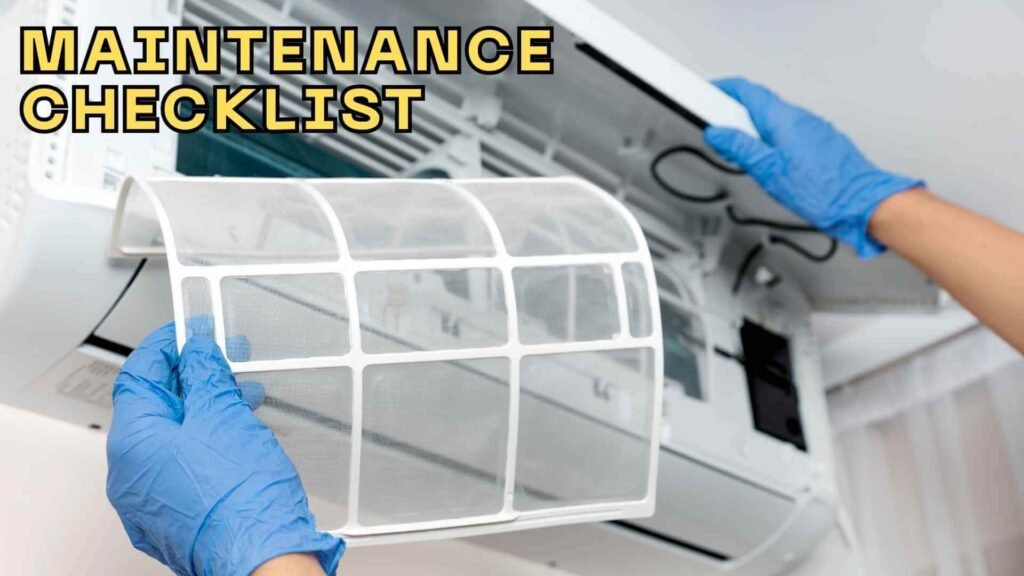
3. Clean or Replace Air Filters
- Check Filter Every 1–3 Months: If you have pets or allergies, clean or replace filters every 1–2 months. Otherwise, every 3 months should suffice.
- Replace if Necessary: If filters are too dirty, replace them with a new one to ensure efficient airflow.
4. Clean the Condensate Drain Line
- Check for Blockages: Inspect the condensate drain monthly. Any blockage or water backup can cause the AC to shut off.
- Flush Drain Line: Use a wet/dry vacuum or mild detergent to clear the drain line annually.
5. Inspect and Clean Coils
- Outdoor Coils: Clear any debris like leaves, dirt, or sticks from the outdoor unit every 3–4 months.
- Indoor Evaporator Coils: Clean the coils if you notice reduced cooling performance or ice buildup.
6. Inspect Ductwork and Vents
- Check for Leaks: Inspect ductwork for leaks or disconnections that could lead to energy loss.
- Clean Vents: Clean both supply and return air vents regularly to ensure proper airflow.
7. Check for Ice Build-up
- Inspect for Frost: If your AC isn’t cooling properly, ice buildup on the evaporator coils may be the issue. Clean coils if needed and check airflow.
8. Schedule Annual Professional Inspection
- Hire an HVAC Technician: Even with regular maintenance, it’s a good idea to have a professional inspect and service your Daikin AC once a year, ideally before the peak cooling season.
FAQs — Fixing a Daikin Air Conditioner That Won’t Turn On
What’s the very first thing I should check if my Daikin AC doesn’t turn on?
First check the circuit breaker or fuse designated for the AC — it might have tripped or blown.
Could dead remote batteries stop the AC from turning on entirely?
Yes. If the thermostat or remote uses batteries, dead ones can prevent any signal reaching the AC. Replace the batteries first.
How often should I clean or replace the air filter?
Generally every 1–3 months — more often if you have pets, dust, or run the AC heavily.
Will resetting the AC by turning off its breaker help sometimes?
Yes — turning the power off for 5–10 minutes and then back on can reset control circuits and fix minor glitches.
What are signs of a failing capacitor in a Daikin AC?
You may hear a single click or a humming sound when turning on, but fan or compressor doesn’t start.
Can a clogged condensate drain stop the AC from powering on?
Yes — many units won’t run if the drain is blocked, to prevent water overflow and damage.
When should I stop DIY and call a technician?
When issues involve internal components (capacitor, compressor, wiring, refrigerant) — or when frequent breaker trips, electrical damage, leaking, or overheating appear.
Summary
A non‑functional Daikin air conditioner is often a result of simple issues — like a tripped breaker, dead remote batteries, or a clogged air filter. Before panicking or spending on a repair call, go through the basic checks: power supply, thermostat, filter, and reset the system. Many times, that’s all it takes to get your AC back.
If those steps don’t fix the problem or you notice signs of internal damage (burnt wiring, humming but no operation, repeated shutdowns), it’s time to call a licensed HVAC technician. Proper diagnosis and safe repair are key — especially when dealing with capacitors, compressors, refrigerant, or electrical wiring.
Stay cool, stay safe — and with a little maintenance know‑how, get your Daikin unit humming again.